
Everything Deletable does
Privacy-first features built for iPhone and Apple Watch — designed to make sensitive data disappear on your terms.


On your wrist, too
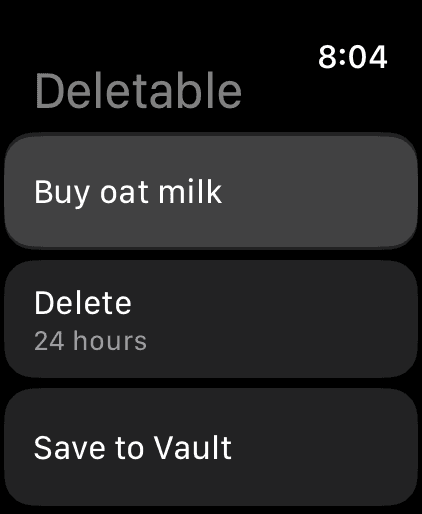
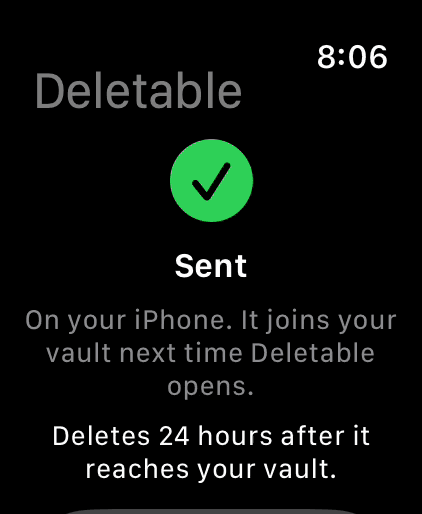
The Apple Watch app is for catching a thought before it gets away. Type or dictate a note, pick when it deletes, and save. It is encrypted on the watch to a key only your iPhone holds — the watch can add to your vault but never read it.
How the watch app works →The Vault
Rich Encrypted Notes
A true WYSIWYG editor — bold, italic, underline, strikethrough, headings, bulleted and numbered lists, and checklists, all rendered inline as you type. Text size comes from S / M / L / XL presets and applies to the selection, not the whole note. Every character is encrypted before it touches disk.
Encrypted Photos
Capture with the in-app camera — shots go straight into the vault and never touch your Camera Roll — or import one photo at a time through the system picker, which never gives Deletable access to the rest of your library. The full image and its thumbnail are both encrypted, and every photo is re-encoded on save — so nothing in your vault carries EXIF.
Photo Markup & Captions
Draw on a photo with Apple’s PencilKit tools and add outlined text labels — before saving, or over a photo already in the vault (iOS). Give any photo a caption, or rename it later; captions are encrypted and searchable, and never shown on the vault cards.
On-Device Suggestions
With Apple Intelligence on, an untitled note gets a short generated title, and a note that mentions a date offers a "delete after …" chip you can tap or dismiss. Apple’s on-device model does the work — nothing is sent anywhere.
Live Text in Photos
Select and copy text in a stored photo, or tap a phone number, address or link inside it. Analysis runs on-device, and the photo is never written anywhere to do it.
Folders That Open In Place
Folders live on a shelf under the vault title, and opening one re-renders the vault around it rather than pushing a screen — folder to folder is one tap, with no stack to walk back out of. Each carries its own default timer, a colour, and an SF Symbol or emoji icon. Free keeps up to 2 folders.
Unlimited Folders
PlusLift the 2-folder cap and organize without limits.
Folder Self-Destruct
PlusGive a folder its own timer and it deletes itself — and everything inside it — when the clock runs out. A countdown banner under the header shows the time remaining while the folder is open.
Custom Fonts & Text Color
PlusSet a note in Serif, Mono or Rounded, and colour any selection in one of seven colours, from the Text Style menu. The formatting toggles, text size, and checklists stay free.
Search With Live Highlighting
Search titles and the opening lines of every note, with the matched terms highlighted in each card as you type. From the main vault it covers everything, folders included; inside a folder it stays in that folder. Hidden until you tap the magnifying glass — on iPhone the field floats above the tab bar, in thumb reach.
Deletion Timeline
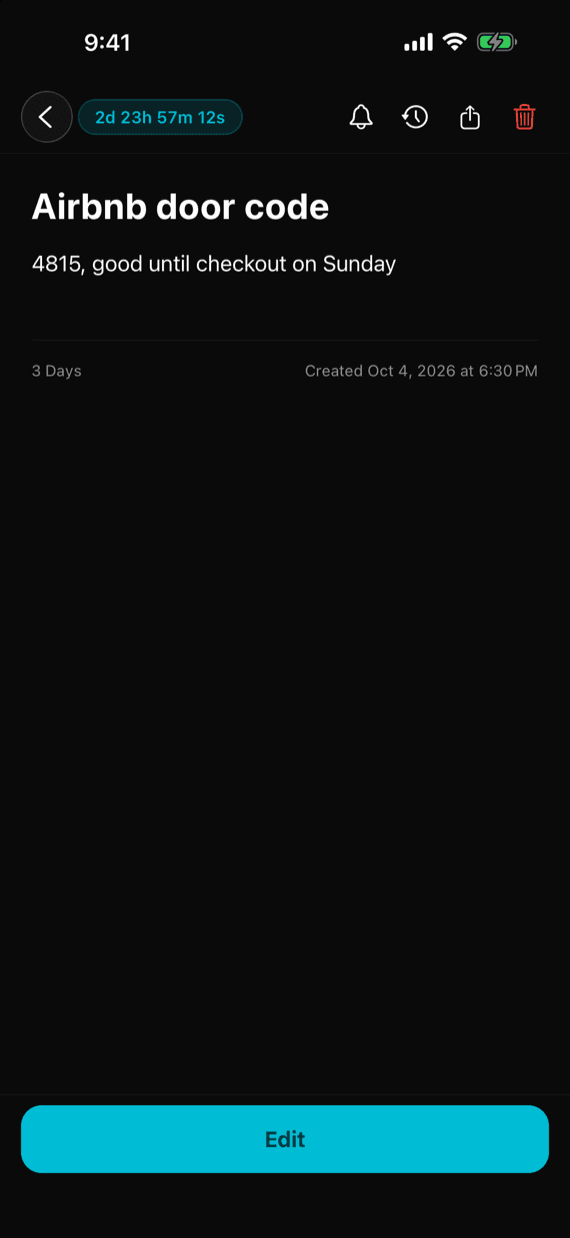
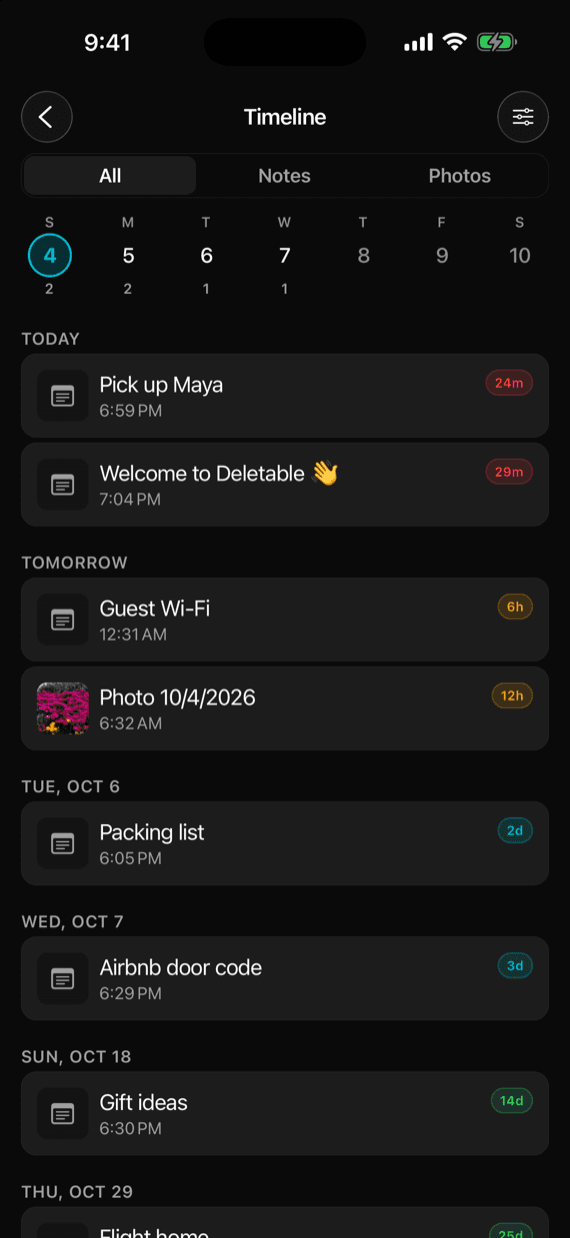
Everything in the vault by the day it deletes — a swipeable week strip with per-day counts over an agenda, filterable by type and folder. Never, location and unopened after-reading items wait in an Unscheduled section.
Layout Options
Switch between 1 or 2 cards per row. Sort by soonest-to-delete or most recently created. Every card carries a live, colour-coded countdown — green, then cyan inside a week, orange inside a day, red inside the last hour.
Multi-Select & Batch Actions
Long-press any card and choose Select. Tap to add more, then move, extend, or delete everything selected in one go — with Select All and Deselect All in the header.
Save a Copy
Long-press a card and choose Save a Copy — or tap Share on an open note or photo — to export a note's text or a photo to Files or your Camera Roll through the native share sheet, before the timer fires and without cancelling the deletion.
Erase Vault
One action in Settings wipes every note, photo, and folder at once, along with the encrypted files, scheduled notifications, and live geofences. It sits behind a two-step confirmation that names the exact counts — and it deliberately leaves your stats and achievements intact.
Deletion
Flexible Expiry Timers
A clean, free ladder covers the essentials — 1 hour, 24 hours, 7 days, 30 days, or Never (keep it forever). New items default to 7 days. Set it once and forget it.
Precise & Custom Expiry
PlusUnlock the fine-grained rungs between the free presets — 30 min, 3 / 6 / 12 h, 3 / 5 / 14 days, 6 months — plus fully custom durations.
Pick an Exact Date
PlusChoose a specific date and time for precise expiry. Perfect for things that need to vanish after a meeting or an event.
Location-Triggered Deletion
PlusSwap the countdown for a geofence: have an item delete itself the moment you arrive at — or leave — a place. Trigger radius is configurable from 100 ft to 5 miles, and the sweep reads the database headlessly, so it fires even while the app is killed.
Delete After Reading
PlusThe countdown starts only when an item is first opened — then it deletes 5 minutes, 1 hour or 24 hours later. Until then its card reads Unopened.
Deletion You Never Have to Trigger
Expired items are purged on launch, on every return to the foreground, and by a background task in between — so an expired item is always gone before it can be seen. The background pass is what gets it off disk sooner; iOS schedules it opportunistically, so if a week passes without one, Settings says Background Deleting Paused and shows how to fix it.
Extend Anytime
Not ready to let go? Open any item and tap the clock-arrow button to push the deadline further out — one at a time, or across a whole batch at once.
Deletion Is Total
When an item expires, the encrypted record, the encrypted file, and its thumbnail are all removed from device storage — not hidden, not trashed, not recoverable. Deleted rows are scrubbed from the database file too, and the vault is kept out of device backups by default — no undo, by design.
Security & Privacy
AES-256-GCM Encryption
Always on — there's no toggle. Every note and photo is encrypted before storage, and GCM is authenticated, so damaged or tampered ciphertext throws instead of decoding to garbage that gets rendered as if it were your note. The whole database is encrypted again with SQLCipher, so titles and previews are sealed on disk too. Keys are sealed in the iOS Keychain and never leave the device.
Face ID, Touch ID & Passcode
Lock the app behind Face ID or Touch ID (with your device passcode as the fallback), or behind a separate 4-digit Deletable passcode — with a lock timeout you choose: immediately, 1, 5, or 15 minutes, or never. The passcode is throttled after four failed attempts — and the throttle is capped, so no clock jump can lock you out of your own vault.
Erase on Failed Attempts & Duress Passcode
Optionally wipe the vault after 10 wrong passcodes in a row, with a warning on the last three. A second, duress passcode erases the vault silently and opens it empty, as though nothing was ever there. Both are opt-in and need a Deletable passcode.
Kept Out of Backups
By default the vault is excluded from iCloud and computer backups, so a restore can never bring back something that already deleted itself. Turn on Include Vault in Backups if you want unexpired items to move to a new iPhone.
No Screenshots, No Recordings
Screenshots and screen recordings of Deletable come out blank for as long as the app is open. The app-switcher preview is blurred too.
Notification Privacy
Expiry reminders never name your item — every one reads "A note or photo deletes in…", so nothing about your vault reaches the lock screen. Reminders you set yourself just say "Reminder" unless you turn on Show Note Content.
No Photo Metadata
A stored photo carries no EXIF: no GPS coordinates, no capture timestamp, no device model. Every import and capture is re-encoded on the way in, so the original bytes never reach the vault — and a test pins that behaviour so it cannot regress.
No Account, No PII
There is no sign-up and no cloud sync of your content. Nothing in the vault is tied to an Apple ID, a Google account, an email, or a name.
One-Switch Analytics Opt-Out
Settings → Privacy → Anonymous Usage Stats. Turn it off and no statistics are sent — and the queued payload is dropped rather than sent later. Crash reports and purchase checks still run. Left on, it syncs only aggregate counts against a random device ID.
Notifications & Awareness
Pre-Expiry Reminders
Optional notifications ahead of deletion. Pick any combination of lead times — 1, 5 or 10 minutes, an hour, or a day before — globally or per item. Change them and the reminders reschedule themselves.
Reminders on Notes & Tasks
PlusSet a reminder on a whole note or on a single checklist item — once, daily or weekly. Tick an item with Mark Done right from the notification, and let a note delete itself once every item is done.
Act From the Notification
Every expiry reminder carries Keep 24 More Hours and Delete Now, so you can decide the moment the reminder arrives instead of opening the app to go find the item. If the sweep already deleted it, the app says so rather than silently doing nothing.
The App Tells You When It Cannot Keep Its Promise
If notification permission was denied or revoked while reminders are still switched on, Settings says Notifications Blocked and taps through to fix it. If the background sweep has not completed in a week, Background Deleting Paused appears — measuring the outcome rather than trusting an OS status that cannot answer the question.
Live Activity & Dynamic Island
When an item enters its final hour, a live countdown appears on the Lock Screen, in the Dynamic Island on iPhone 14 Pro and later, and in a paired Apple Watch’s Smart Stack. On by default. Location-triggered items have no countdown, so they are excluded rather than faked.
Add to Calendar
Opt in and each timed item gets a generic "Deletable item deletes" event in a separate iCloud calendar, so your Mac and iPad remind you too. No title, content or link from the item is ever included.
Place Pins
Drop a place into any note — search an address, tap the map, or use where you are — and it renders as a map card that opens directions in Apple Maps or Google Maps. Your coordinates never leave the device.
Platform Integrations
Share Into the Vault
Save into Deletable from anywhere — the native share extension lands on a receive screen with the full title, folder, timer and notification controls.
Siri Shortcuts
Say "Add a note to Deletable", "Add a photo to Deletable", or "Check my Deletable vault." In Shortcuts, a workflow can hand Deletable text or a photo to save, or open Search Vault with a term. Every action needs an unlocked iPhone, and content only goes in — the vault check reads a count, never content.
Home Screen Quick Actions
Long-press the Deletable icon to jump straight into Add Note or Add Photo. If the app is locked, the unlock screen comes first and the action runs after.
Home & Lock Screen Widgets
Deletes Soonest counts down to your next deletion on the Home Screen or the Lock Screen, with one-tap Note and Photo buttons; Trash Level shows your tier and progress toward the next. Counts and times only, never titles or content.
Control Center & Action Button
New Deletable Note and New Deletable Photo controls — drawn as the Deletable raccoon, so they never read as another app — for Control Center, the Lock Screen and the Action button.
Apple Watch Quick Notes
Type or dictate a note on your wrist, pick when it deletes, and save. Each note is encrypted to a key only your iPhone holds and moves into the vault the next time Deletable opens there — the watch can add notes but never read them. A confirmation screen shows whether the note has reached your iPhone and when it will delete. Complication, Smart Stack, and Siri included.
Hardware Keyboard Shortcuts
⌘N and ⌘⇧N for a new note or photo, ⌘F to search, ⌘1 / ⌘2 / ⌘3 to switch tabs, ⌘E to share, ⌘A to select all, ⌘⌫ to delete a selection — with the confirmation prompt intact — and Esc to leave it.
Accessibility Built In
Follows Increase Contrast with a higher-contrast palette, Reduce Transparency with solid surfaces in place of glass, and Reduce Motion — and every control is labelled for VoiceOver.
Liquid Glass UI
A floating capsule tab bar with an animated active pill, drawn with the system Liquid Glass material and scaled crisply across every iPhone size.
Dark / Light / System Theme
Follows your system appearance, or lock it to dark or light in Settings. Context-sensitive haptics throughout.
Alternate App Icons
PlusSwap the home-screen icon for a raccoon-face, light-raccoon, trash-can, or shredder variant. The default Liquid Glass raccoon always stays free, so you can switch back at any time.
Stats & Achievements
11 Achievement Tiers
From Trash Panda (3 items) to Event Horizon (10,000). Total deleted, notes and photos, space freed, and an estimate of the time saved, with a growing emoji trash-pile hero — all free, all on device.
Shareable Stats Card
Render your tier, items deleted, and bytes freed as an image and share it anywhere. Classic is free and stays the fallback — so a card always renders, whatever your tier or plan.
Stat Card Themes
PlusPaper, Midnight and Raccoon palettes for the shareable card.
Expiration Habits & Pace
PlusWhich timers you actually pick, as a ranked bar list, plus your delete pace — "deleting for 92 days · 4.2 per week." The headline totals, the tier ladder, and the share button stay free.
Features marked Plus
Everything that protects your privacy — encryption, biometric lock, the free expiry ladder, the stats page, and sharing — stays free forever. Deletable Plus unlocks the power-user extras: precise timers, location-triggered and read-triggered deletion, reminders, unlimited folders, custom styling, deeper stats, and more. From $0.99 a month, or $19.99 once for life.
See what's in Deletable Plus →Ready to clean up?
Free download. No account. No compromise.